
 EN
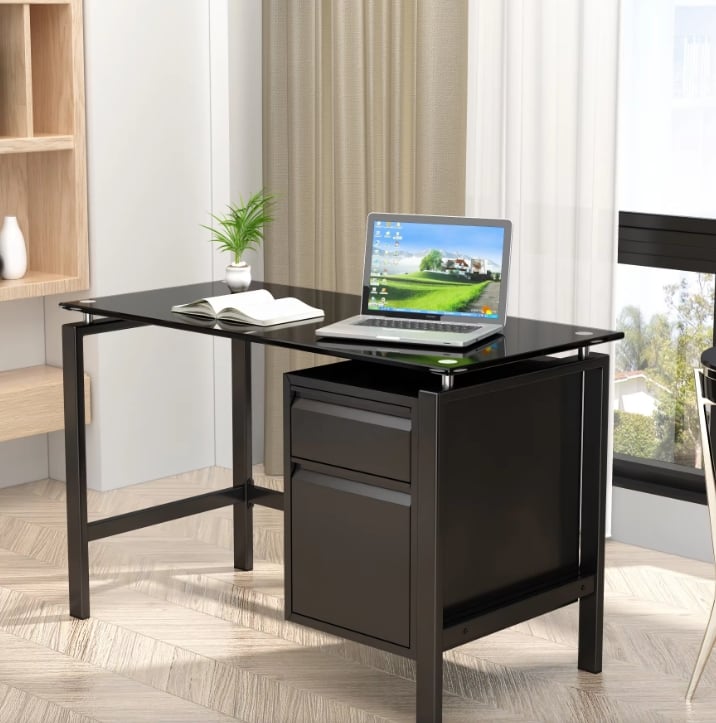
University computer laboratories, software development hubs, technical call centers, and hospital electronic-charting rooms place concentrated thermal, electrical, and mechanical demands on every workstation. Sourcing specialized steel computer office desk units requires looking beyond a flat writing surface to engineer airflow around tower PCs, bend-radius protection for high-speed data cables, and torque-resistant rear overhangs for multi-screen arms.
IT Hardware Failures Caused by Generic Office Tables
Deploying unspecialized flat tables inside dense IT environments creates recurring equipment outages, thermal throttling, and workstation clutter that slow down technical staff daily.
Overheated Workstation Towers Trapped in Unventilated Bays
Enclosing high-wattage CAD or enterprise desktop towers inside solid-walled cabinet cubbies traps hot exhaust air immediately. Internal processor and graphics temperatures climb rapidly during sustained workloads, triggering loud cooling-fan roar, thermal clock-speed throttling, and premature power-supply capacitor failure.
Sheared Network Cables and Deformed Monitor Clamp Overhangs
Generic thin-edged tables lack dedicated rear clamping depth or smooth grommet linings. Tightening dual-monitor VESA C-clamps crushes hollow rear overhangs, tilting expensive displays forward, while sharp unhemmed sheet-metal pass-through holes chafe through Cat6A Ethernet jackets and DisplayPort cords whenever desks vibrate.
Technical Specifications for Sourcing Steel Computer Desks
Experienced IT procurement teams and commercial furniture importers verify five hardware-integration pillars before approving bulk production runs.
|
IT Workstation System |
Commercial Steel Engineering Spec |
Operational IT Payoff |
|
CPU Tower Enclosure |
CNC louver-punched steel bay + open rear exhaust channel |
Prevents thermal throttling while locking hardware securely |
|
Monitor Clamp Zone |
>= 60 mm rear overhang + triple-folded box-edge stiffener |
Anchors heavy dual/triple VESA poles with zero tilt |
|
High-Capacity Wire Trough |
Dual-channel folded steel under-tray + ABS brush grommets |
Separates AC power bricks from low-voltage Cat6A bundles |
|
Anti-Glare Work Surface |
Low-sheen micro-textured powder finish + acoustic pads |
Cuts dual-screen reflection fatigue and keyboard noise |
|
Flat-Pack Logistics |
Modular knock-down steel panels + mail-order drop cartons |
Fast elevator staging into upper-floor server/training labs |
Designing Louvered Lockable CPU Bays With Positive Airflow
Public-facing training rooms, university labs, and shared shift desks often lock workstation towers inside under-desk steel cages to prevent USB tampering or drive theft. Precision CNC turret-punched louver arrays along side and front doors—paired with unobstructed rear exhaust cutouts—maintain steady cross-ventilation without exposing internal components.
Separating Power Bricks From Data Cabling Inside Steel Trays
Commercial computer stations carry bulky surge strips, PoE injectors, docking bricks, and thick display cables. Deep horizontal steel wire troughs suspended beneath the rear worktop cradle heavy transformers off the floor while keeping high-frequency data patch cords isolated from AC electromagnetic interference.
Partnering With Audited OEM Factories for Custom IT Cutouts
Different institutional projects specify distinct desktop port diameters—ranging from 60 mm round ABS grommets to wide rectangular flip-top aluminum power brush boxes. Founded in 1992, Luoyang Huawei Office Furniture Co., Ltd. became the first factory in the Luoyang office furniture industry to pass third-party factory inspection and pioneer mail-order packing—enabling B2B buyers to customize CNC port cutouts and ventilated computer desk layouts from CAD plans with courier-safe flat-pack protection.
Industry Safety, Ergonomic, and Electrical Routing Standards
Institutional IT tenders align computer workstation procurement with established technical codes:
- ANSI/BIFMA X5.5: Validates desktop concentrated proof loads and center-span deflection limits under heavy multi-monitor arrays and tower chassis weights.
- OSHA Computer Workstation & Electrical Safety Guidelines: Ensures ergonomic screen-to-eye viewing distances (500 to 700 mm desktop depth), neutral wrist heights, and zero pinched or frayed power cords through smooth rolled steel ports.
- NFPA 70 / NFPA 101 Alignment: Non-combustible cold-rolled steel frames reduce fuel loads around energized IT power strips while keeping corridor egress routes clear of floor cable snakes.
- ISO 9001 & ISO 9227: Guarantees repeatable CNC hole alignment for IT mounting brackets and rust-free powder finishes in heavily air-conditioned server-adjacent rooms.
Practical Sampling, Lab Rollout, and IT Upkeep Protocols
Coordinating facilities installers with corporate IT engineers before container arrival prevents costly retrofits on move-in weekend.
Testing Real Docking Hardware on the Golden Sample
Before signing off mass production, clamp the actual enterprise monitor arm, drop the standard corporate power strip into the steel wire trough, and slide a full-tower PC chassis into the CPU bay on the physical prototype. Confirming plug-head clearance through desktop grommets upfront avoids field drilling entirely.
Annual Dust and Grounding Checks in High-Density Computer Labs
Every six to twelve months in high-density computer labs, blow accumulated lint out of perforated steel CPU louvers using dry compressed air, inspect nylon grommet rings for secure seating, and verify leveling glides keep adjacent benching rows flush so shared trunk cables experience zero tension.
Frequently Asked Questions
What desktop depth is recommended for commercial steel computer office desks?
While compact 600 mm depths suit single-laptop hot-desking stations, multi-monitor desktop computer workstations perform far better at 700 mm to 750 mm depth. Extra front-to-back depth preserves healthy 500+ mm ergonomic viewing distance from large 27-inch or 32-inch monitors while leaving room for forearm support.
Do steel computer desks cause static electricity issues around sensitive electronics?
Properly finished steel computer desks coated in cured 60 to 80 micron epoxy-polyester powder act as smooth insulated work surfaces during everyday office computing. For specialized electronics assembly or server testing benches, OEM factories can formulate specialized electrostatic-dissipative (ESD) powder coatings with dedicated grounding studs.
How are sliding keyboard trays attached to cold-rolled steel computer desks?
Unlike wood tops where installers drive wood screws anywhere, steel computer desks ordered for sliding keyboard mechanisms feature pre-welded underside steel mounting channels or riveted M6 threaded nutserts positioned at standard ergonomic centerlines, allowing rapid bolt-on track installation with high pull-out strength.
How much ventilation opening area does an enclosed steel CPU cabinet need?
To prevent thermal buildup around 250-watt to 500-watt commercial workstation towers, steel CPU bays typically combine multi-row stamped intake louvers across the lower front door with an open or wide-mesh rear exhaust panel, maintaining unrestricted front-to-back airflow aligned with chassis fans.
Can steel computer desks route cables invisibly down desk legs to floor boxes?
Yes. Commercial steel computer desks frequently incorporate hollow double-wall C-channel legs or snap-on vertical steel wire risers clipped inside the rear leg profile, guiding power and Ethernet bundles neatly from the under-top wire trough straight into raised-access floor outlets.
Why is flat-pack mail-order packaging valuable for IT equipment distributors?
IT solution providers and B2B office dealers often ship workstations alongside monitors and docking stations directly to client branch offices. Drop-tested 5-ply mail-order cartons reinforced with honeycomb padding and corner guards allow individual computer desks to travel safely through standard LTL or parcel networks without pallet damage.